
If you've ever been kept awake by a gaming PC that sounds like a vacuum cleaner, you already know the problem — most of that noise comes from the case, not the components inside it. A quiet PC case doesn't silence your build; it makes your fans work so efficiently that they barely need to spin. This guide breaks down what actually makes a case quiet, which specs to check before you buy, and how XERON cases are designed to run cool at low noise.
Quick Answer: What Makes a PC Case Quiet
If you're short on time, here are the numbers to look for before buying a quiet PC case in 2026:
| Target | Spec to Look For |
|---|---|
| Idle noise | 20-25 dB — barely audible in a normal room |
| Gaming-load noise | Under 35 dB — below normal conversation |
| Fan size | 140mm preferred, 120mm minimum; run at 40-60% RPM |
| Radiator support | Top-mounted 360mm AIO radiator |
| Airflow layout | Front intake, top and rear exhaust, dedicated PSU intake channel |
What "Quiet" Really Means for a PC Case
A quiet case is not a sealed box. It is a case that moves air efficiently enough that every fan in your system can run at low speed — because fan speed, not fan size, is what you actually hear. A well-designed quiet case keeps temperatures in check with slow-moving air, so you get silence without cooking your hardware.
| What To Expect | Why It Matters |
|---|---|
| Quiet at idle | Idle noise of 20-25 dB is barely audible in a normal room. Fans should sit at their lowest speed when the PC is not under load. |
| Quiet under load | During gaming, a good case keeps fan speeds moderate, so noise stays below the conversation level of a normal room. |
| Not the same as a sealed case | Blocking sound with solid panels traps heat, forcing fans to spin faster — the opposite of quiet. Silence comes from airflow efficiency, not insulation alone. |
The Anatomy of a Quiet PC Case
1. Fan Mounts That Accept Big Fans
Fan noise scales with RPM, not with airflow. An 80mm fan must spin past 2500 RPM to move the same air a 140mm fan moves at 800 RPM — and that whine is exactly what you hear through your desk. Look for cases with at least four 120mm mounts, and ideally 140mm support in the front or top. More mounts mean you can run every fan slow and still cool the whole system.
2. An Unobstructed Airflow Path
Cool air should reach the CPU, GPU and PSU in a straight line. When intakes are cramped or choked by brackets, air turns turbulent and fans have to push harder. Cases with separate, dedicated intake channels for each component — the design XERON uses on C Lab and S Lab — keep every part cool with minimal fan effort. A poorly cooled GPU can hit 72°C under load; a well-designed quiet case keeps it in the low 50s, which is the difference between fans screaming at 1500 RPM and humming at 800. This is the single biggest factor in a silent build.
3. Big Radiator Support
A 360mm radiator spreads the cooling load across three fans and a huge surface area, so the fans barely need to spin under most loads. Radiator support also future-proofs the build: a high-end CPU cooler upgrade fits without changing the case.
4. Rigid Construction
Fan vibration travels through thin, poorly braced panels and turns into a constant hum. Thicker SPCC steel, tempered glass mounted on rubber gaskets, and tight panel locks stop that resonance before it starts. This is why the NEX C56 combines a full steel frame with glass panels — structure first, looks second.
Damping Foam vs. Airflow Efficiency
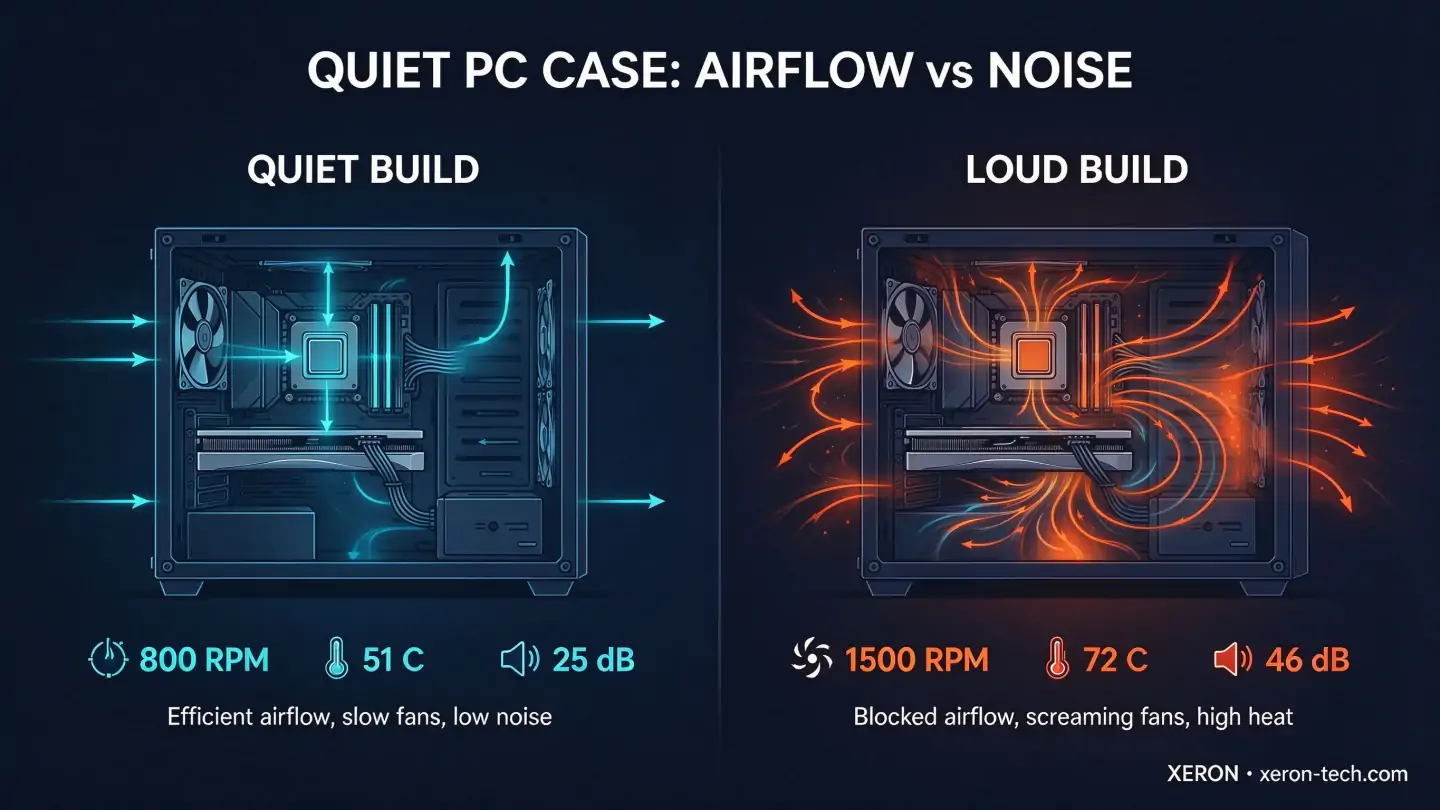
| Approach | How It Works | Trade-off |
|---|---|---|
| Noise-dampening foam | Acoustic foam absorbs sound inside sealed panels | Adds weight and cost; can trap heat and raise fan speed |
| Airflow efficiency | Open, direct cooling channels keep components cool so fans run slow | Requires careful case design; no single foam panel to point at |
| Best of both | Efficient airflow plus low-RPM fans on good mounts | Delivers the quietest result for daily gaming |
Best XERON Cases for a Quiet Build
| Case | Why It Runs Quiet | Key Specs | ||
|---|---|---|---|---|
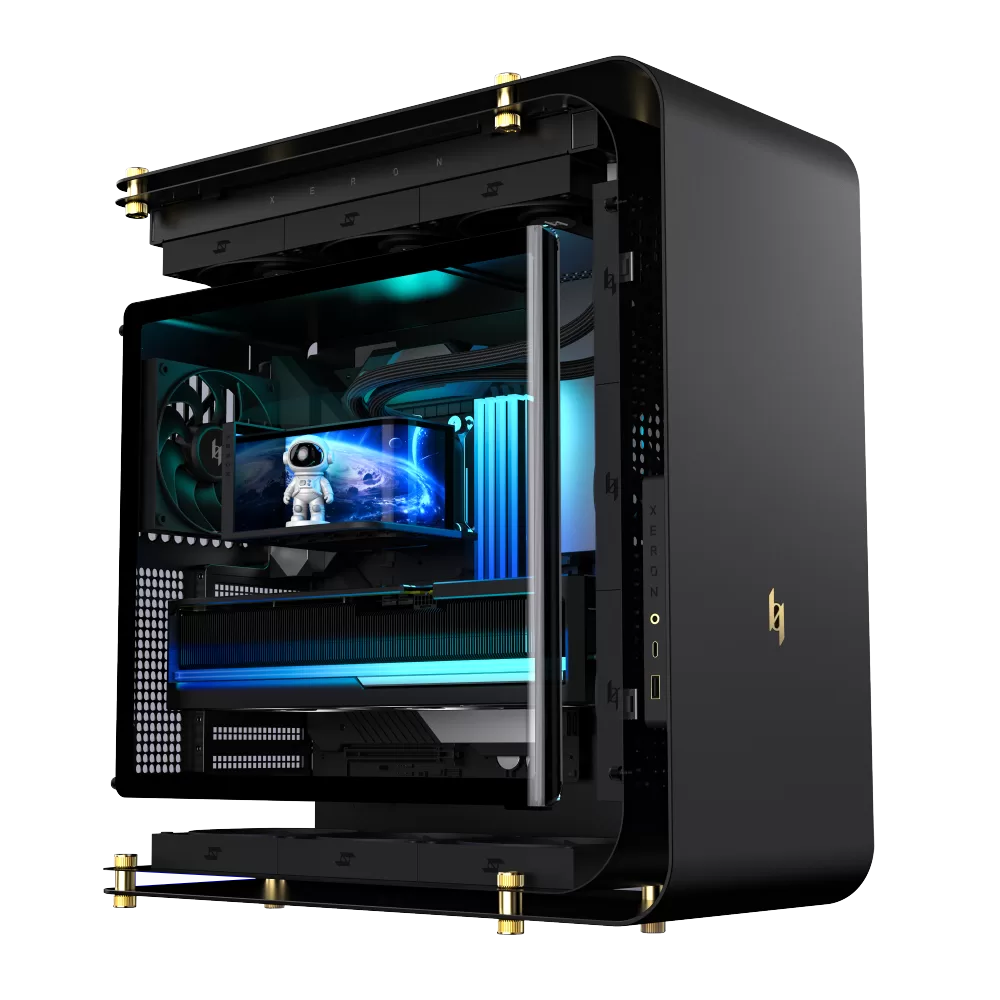 | XERON C Lab | Independent unobstructed intake channels for CPU, GPU and PSU — components stay cool with slow fans | Integrated sheet metal frame · C-shaped suspension · Type-C + USB-A + Audio | View → |
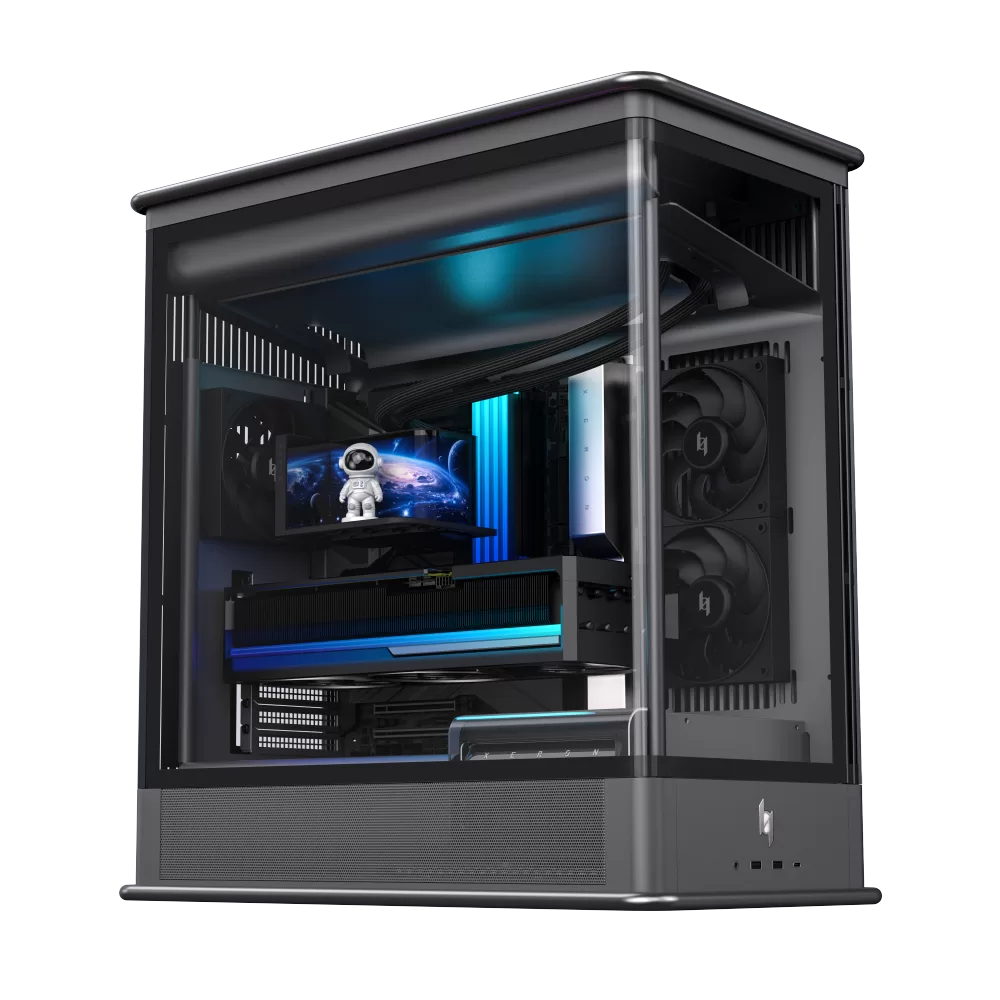 | XERON S Lab | Independent airflow channels plus a louvered high-performance shell option for low-resistance cooling | Integrated sheet metal frame · open / sea-view / louvered shells · top-pull opening | View → |
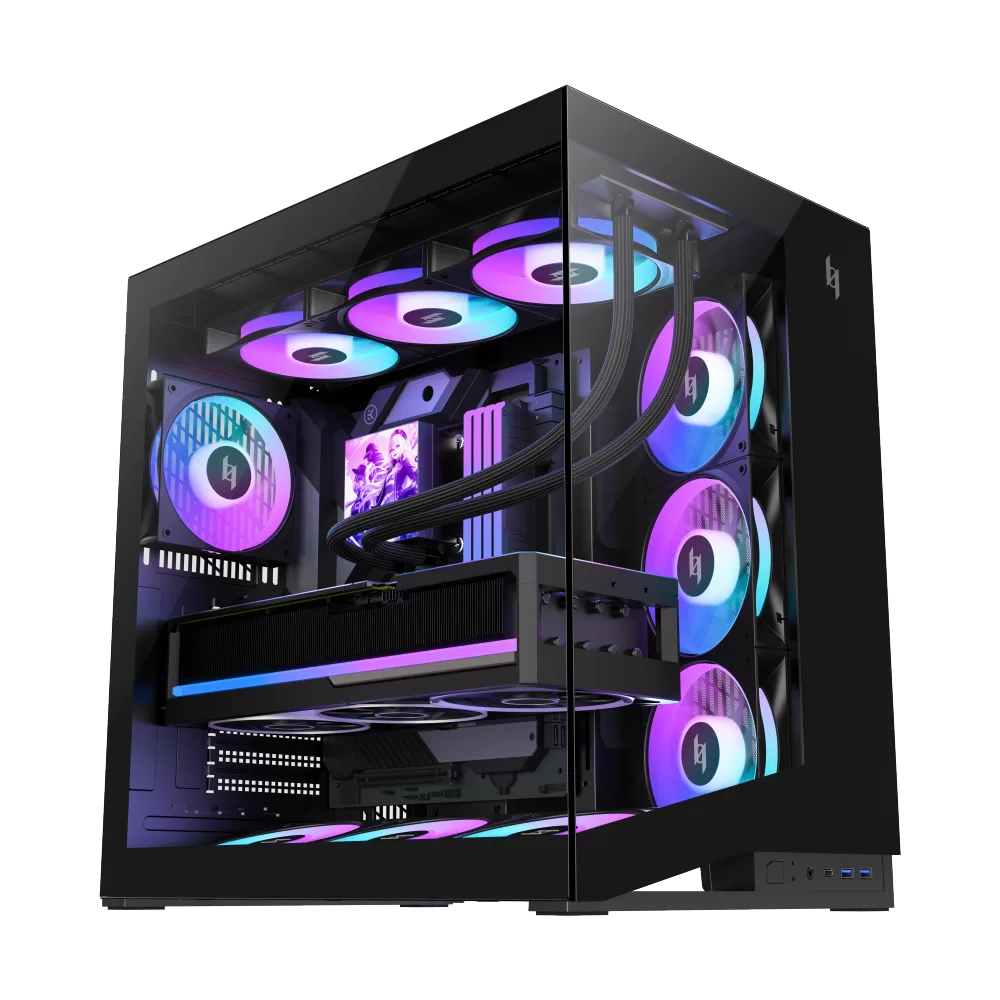 | XERON NEX C56 | Seven 120mm fan mounts and 360mm radiator support — run large fans at low RPM for silence | Tempered glass + SPCC · top 360mm radiator · GPU up to 425mm · front Type-C | View → |
A 5-Step Guide to a Quieter Build
| Step | What To Do | Why |
|---|---|---|
| 1. Set a fan curve | In BIOS, keep fans at 40% until 60°C, ramping only at 75°C+ | A tuned curve can drop perceived noise from 46 dB to around 40 dB — most components never need full speed |
| 2. Prefer 140mm fans | Use 140mm fans where the case allows (front and top) | Same airflow at lower RPM — the easiest single noise win |
| 3. Keep filters clean | Vacuum intakes and filters every 2-3 months | Dust-clogged intakes silently raise fan speed and noise |
| 4. Let the PSU breathe | Choose a case with a dedicated PSU intake channel | A cool PSU keeps its fan off or slow; hot PSUs ramp loudly |
| 5. Use a big radiator | Match the case's top 360mm support with a 360mm AIO | Three fans on a large radiator run nearly silent under gaming load |
Quiet PC Case — FAQ
| Question | Answer |
|---|---|
| What makes a PC case quiet? | Three things: fan mounts that accept big 120mm or 140mm fans, an efficient airflow path so fans can run slow, and rigid panels that don't resonate. A case with all three can run near-silent under normal loads. |
| Do XERON cases have noise dampening foam? | No — XERON takes a different route to quiet. C Lab and S Lab use separate unobstructed intake channels for CPU, GPU and PSU, so components stay cool and fans stay slow. That keeps noise low without trapping heat. |
| Are bigger fans really quieter? | Yes. A 140mm fan moves as much air as a 120mm fan at a lower RPM, and lower RPM means less whine. Cases with multiple 120mm and 140mm mounts, like the NEX C56, give you that headroom. |
| Water cooling or air cooling — which is quieter? | It depends on the radiator. A 360mm AIO with three fans at low RPM is often quieter than a small air cooler. What matters most is radiator size and fan speed — big radiator, slow fans, little noise. |
| Should I buy a case with a solid front panel for silence? | Solid panels block noise but also block airflow, which makes fans spin faster and defeats the purpose. Efficient open airflow with slow fans is quieter than a blocked case with hot components. |
| How do I make my current PC quieter? | Start with a fan curve (40% up to 60°C), clean the dust filters, swap small fans for 140mm where possible, and make sure the PSU has its own cool airflow. These steps usually cut perceived noise by half. |
| Is a quiet PC case worth the extra cost? | For daily gamers and anyone who works near their PC, yes. Efficient airflow means lower fan speed, less noise, and often better component thermals — the case is the one part you keep for years. |
| Does a tempered glass case make more noise? | Not if the glass is mounted correctly. XERON mounts tempered glass on rubber gaskets with tight locks, so panels stay vibration-free. Glass looks good and stays silent. |
Related Quiet Build Topics
Keep tuning your build with these XERON guides and tools:
| Topic | Why It Matters for a Quiet Build |
|---|---|
| PC case with front USB-C | Modern front-panel I/O — fast transfers without reaching behind the desk |
| Browse all XERON cases | Compare fan mounts, radiator support and airflow layout before you buy |
| PC building tools | PSU size, CPU and GPU benchmarks, bottleneck and FPS calculators — pick parts that stay cool |
Ready to build a quiet gaming PC? Browse the full XERON case lineup — every model is built around efficient airflow and clean cable paths, so your next build can run cool without sounding like it. Explore XERON Cases →